Synchrotron Data Analysis Software Platform
Software
All softwareBrowse the full catalogueImagingCT, Ptycho, BCDI, HoloDiffraction & scatteringPDF, SAXS, BMX, XPCSSpectroscopyXAS, XRF, XRS, PCA/LCFData toolsConversion, cropping and formatsArtificial intelligenceSparse-view CT, training and inference
Download
Download centreAll software packagesDownload & installLicence, checksums and setup
Documentation
DocumentationAll documentationSoftware manualsUser guidesAPI guidePublic and maintainer APIsDownload & installChecksums and setupDAISY user docs ↗Framework and algorithms
NewsTeamAbout DAISYTORCH platform ↗
中文
DAISY Data Processing Software

Official site of HEPS DAISY data processing software: introductions, online access and downloads.

Navigation
  • Software
  • Download
  • Documentation
  • News
  • Team
  • About DAISY
  • Admin
Links
  • TORCH platform ↗
Institute of High Energy Physics, CAS · HEPS Big Data Centre
← Back to software
Imaging

HEPSCT

X-ray CT data processing and reconstruction: projection pre-processing, phase retrieval, artifact correction, image stitching, and GPU-accelerated / multi-GPU tomographic reconstruction.
BeamlinesID07ID09ID19ID21ID30
Open in TORCH ↗Documentation ↗
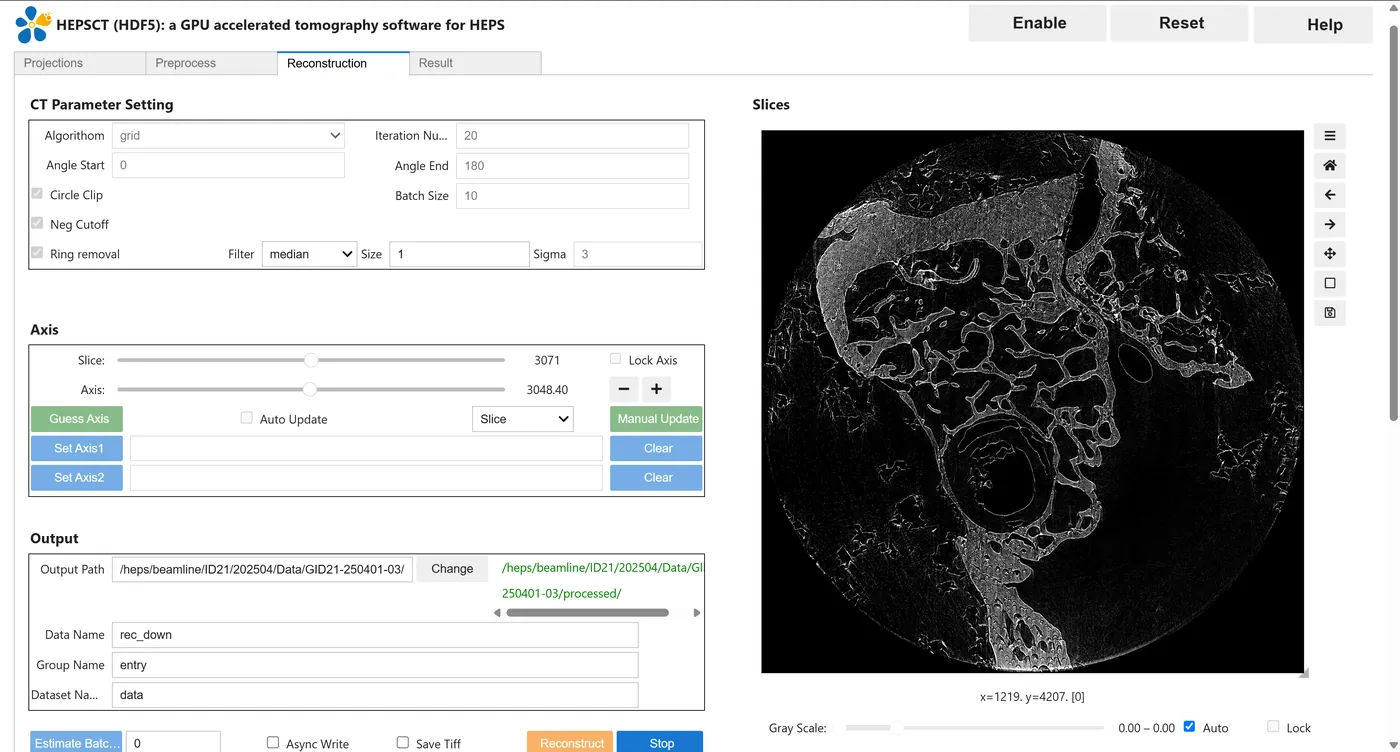
HEPSCT screenshot

About this software

HEPSCT is data processing and three-dimensional reconstruction software for X-ray CT. Its front end is built on the JupyterLab ecosystem with ipywidgets, and its back end integrates MOCUPY, the GPU reconstruction core developed by the HEPS X-ray microscopy imaging beamline team (CUDA + Python). It runs in a browser without local installation, and is also shipped as Windows / Linux desktop packages.

Modules

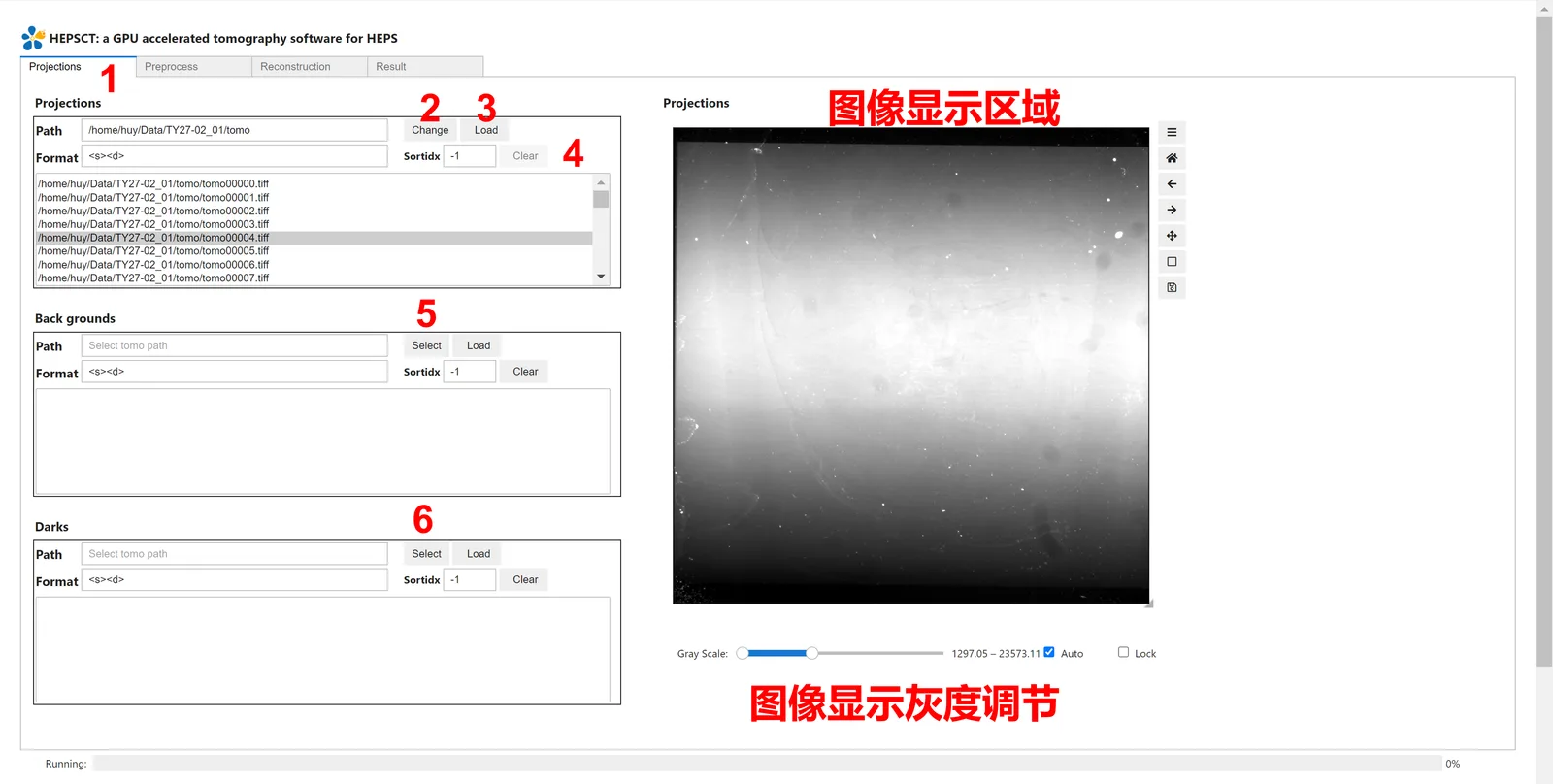
  • Projections: import projection, flat-field and dark images; preview and load a subset of the file list
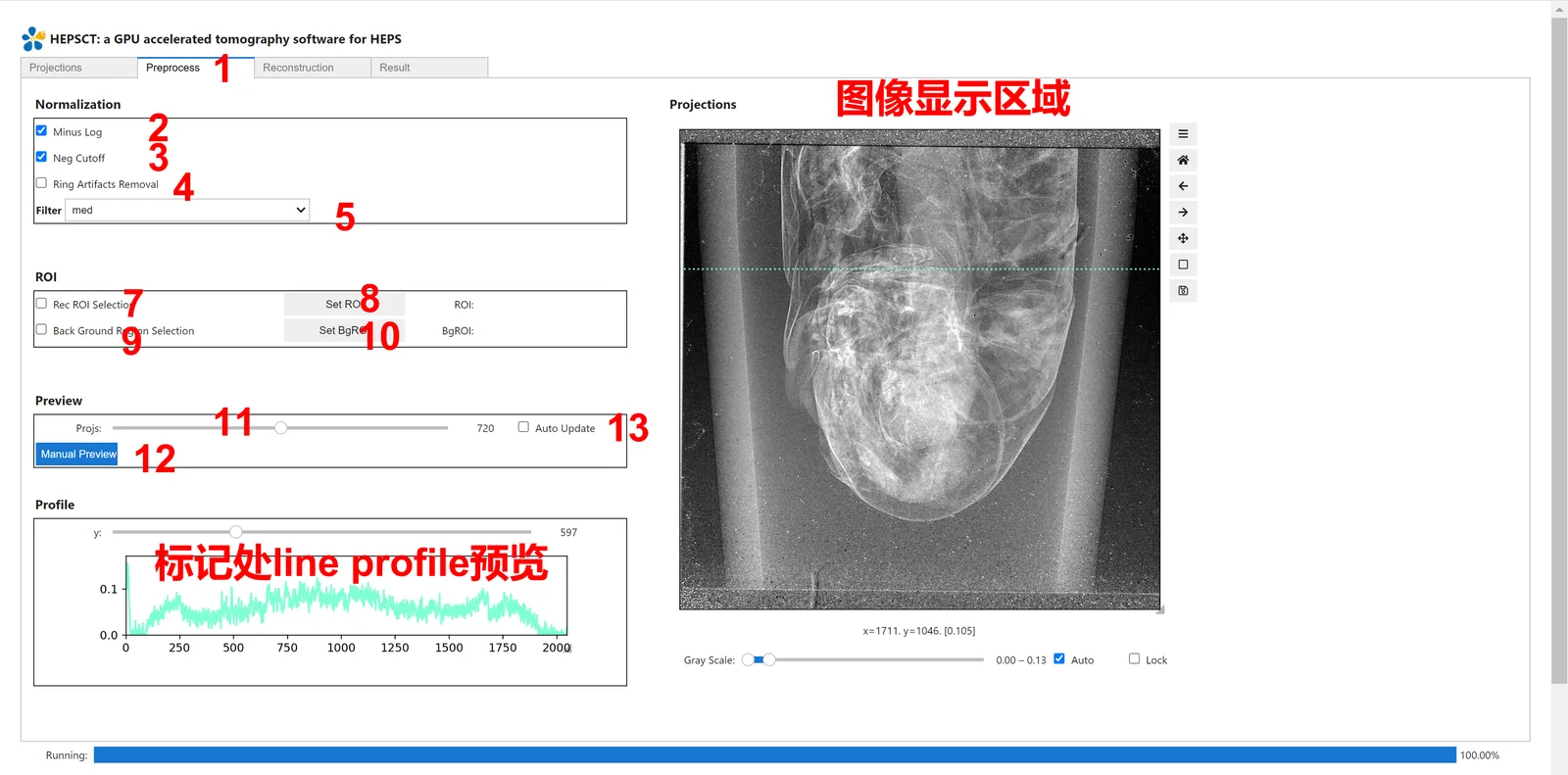
  • Preprocess: denoising, background subtraction (−log((projection − dark) / (flat − dark))), negative-value removal, ROI selection, background-ROI normalisation and line-profile preview
  • Alignment: stage-jitter correction for nanoscale CT, in both manual and automatic (marker-based) modes
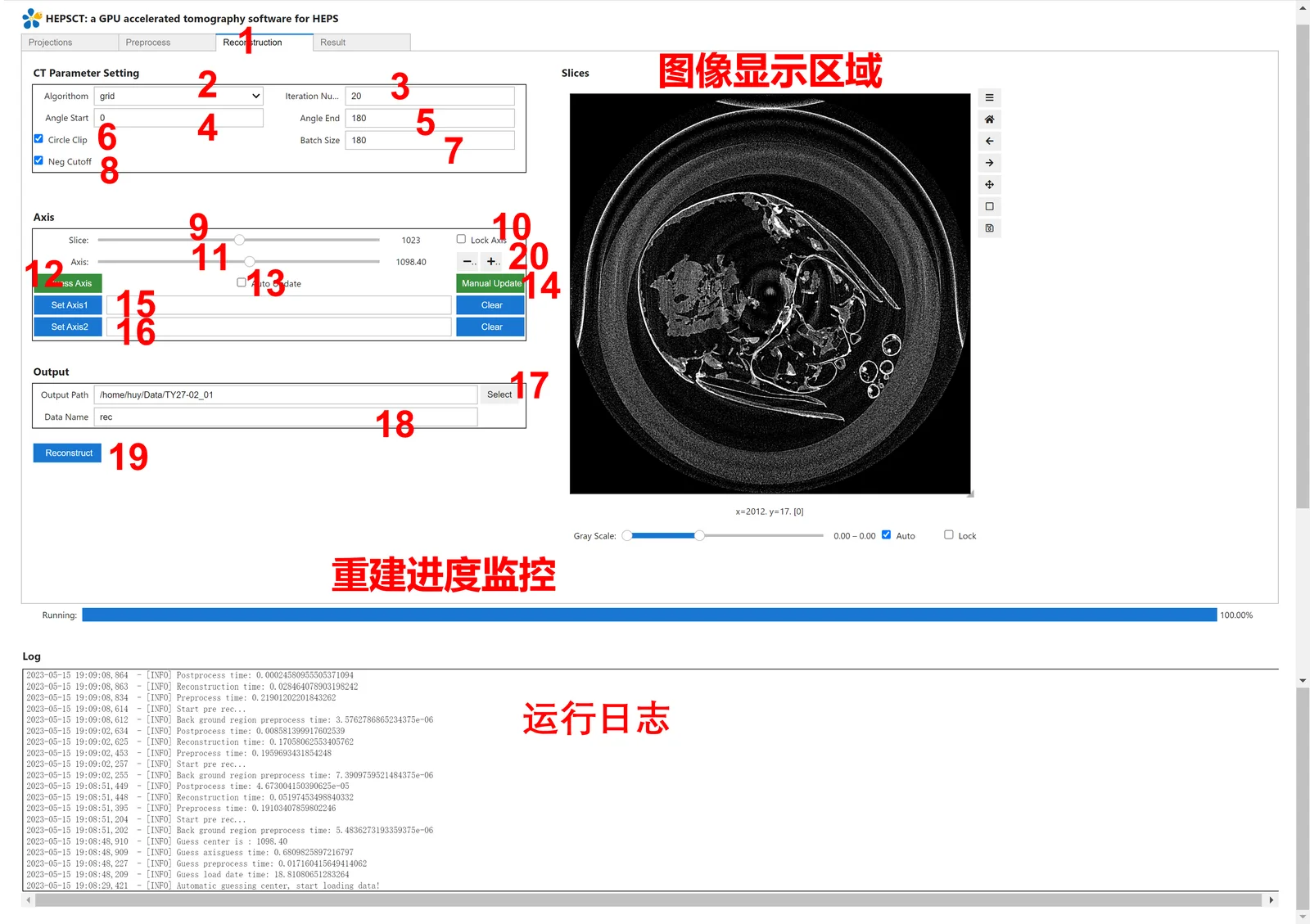
  • Reconstruction: FBP, Grid, EM and other algorithms, ring artifact removal, automatic rotation-axis estimation with manual fine tuning, axis interpolation between the upper and lower slices, and slice preview
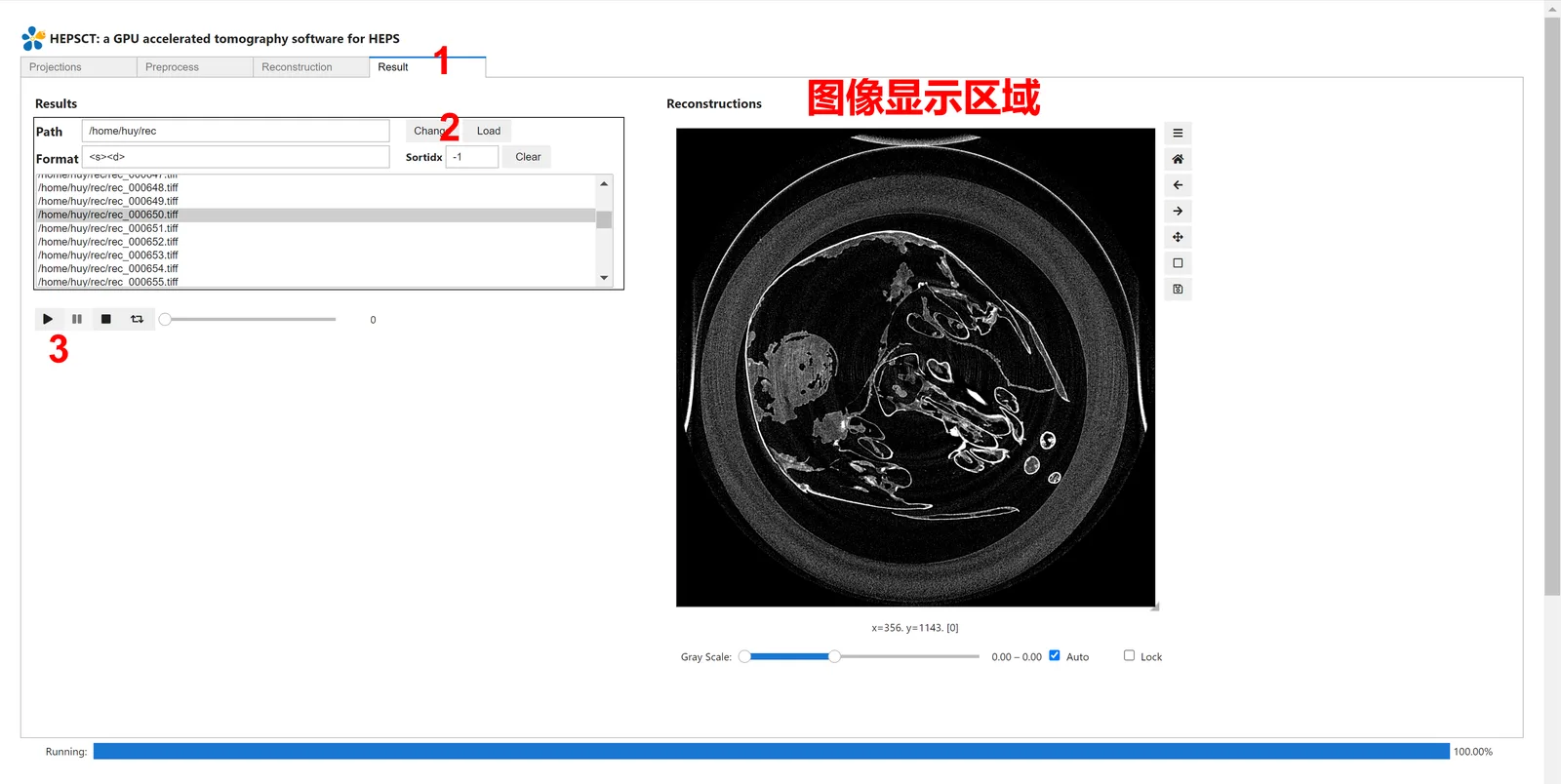
  • Result: browse the reconstructed volume
  • Stitching: merge several detector scans into one volume — horizontal (several X scans of one layer, widening the field of view), 360°→180° (the mirrored halves are flipped and fused) and vertical (layers stacked along the slice axis), with batch runs

Data and algorithms

  • Input: uncompressed TIFF (8-bit uint, 16-bit uint, 32-bit float) or HDF5 in the HEPS imaging-beamline layout; output: 32-bit float TIFF slices

  • TIFF index numbers must have a fixed width, e.g. tomo_0001 … tomo_0180

  • The reconstruction core is fully GPU accelerated, with multithreaded I/O and overlapped CPU/GPU processing

  • Automatic multi-scale rotation-axis correction and wavelet-based ring artifact removal

  • Grid reconstructs a 2k×2k projection dataset in seconds

  • Multi-GPU parallel reconstruction for large batches of CT data

  • Projection stitching before reconstruction: adjacent scans are registered on their overlap and then merged at the measured positions; the horizontal, 360°→180° and vertical steps can be run one by one or in a single batch

  • The result is saved as HDF5 with positions files (recording each tile) and reports; the overlap percentage in the UI only narrows the search range
Access and requirements

  • Browser: launch it on the TORCH computing platform and sign in with an IHEP unified account
  • Desktop: Windows / Linux packages; an NVIDIA GPU is required, NVMe storage is recommended, and memory must match the slice thickness and projection size

Software interface

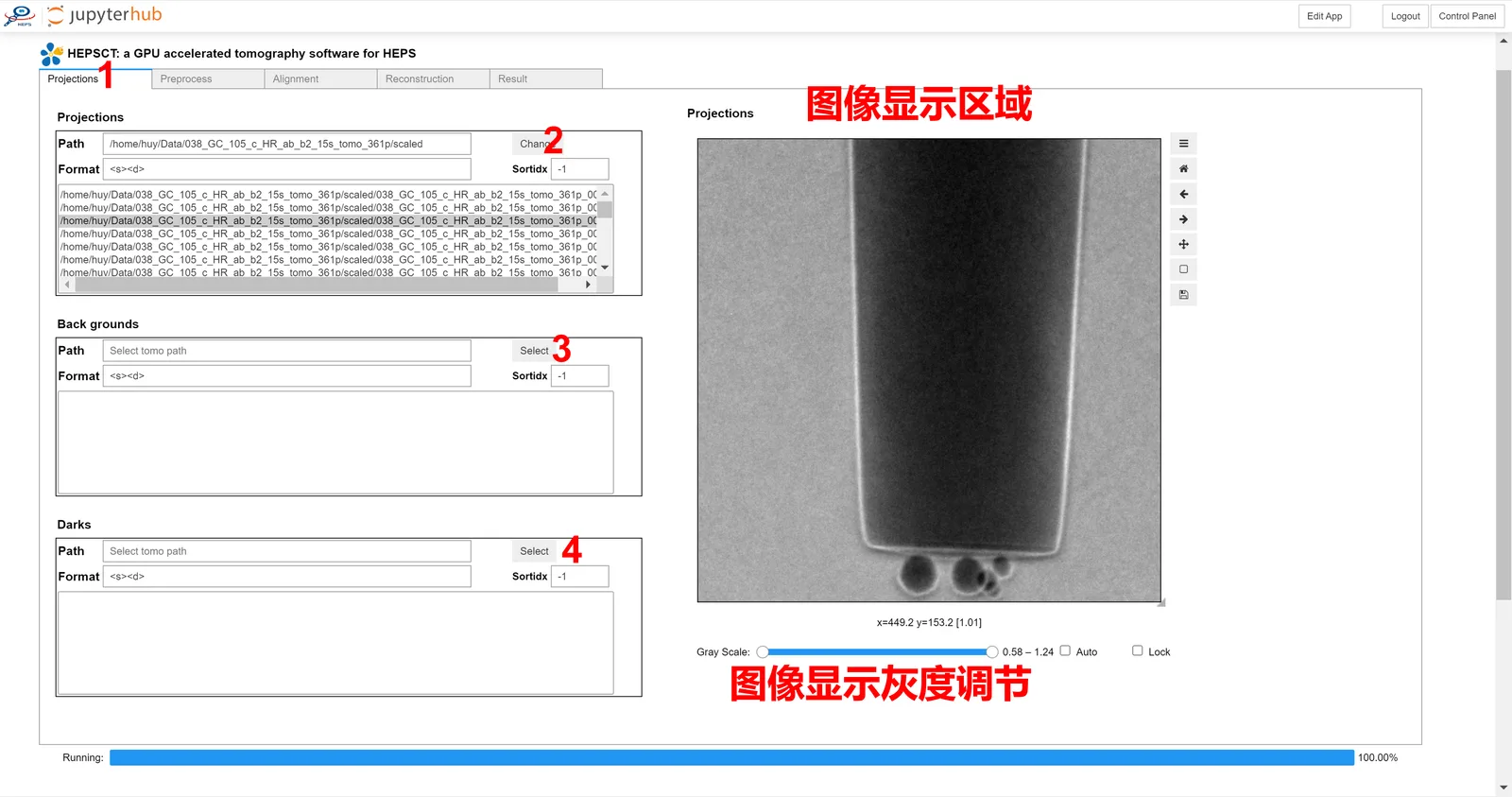
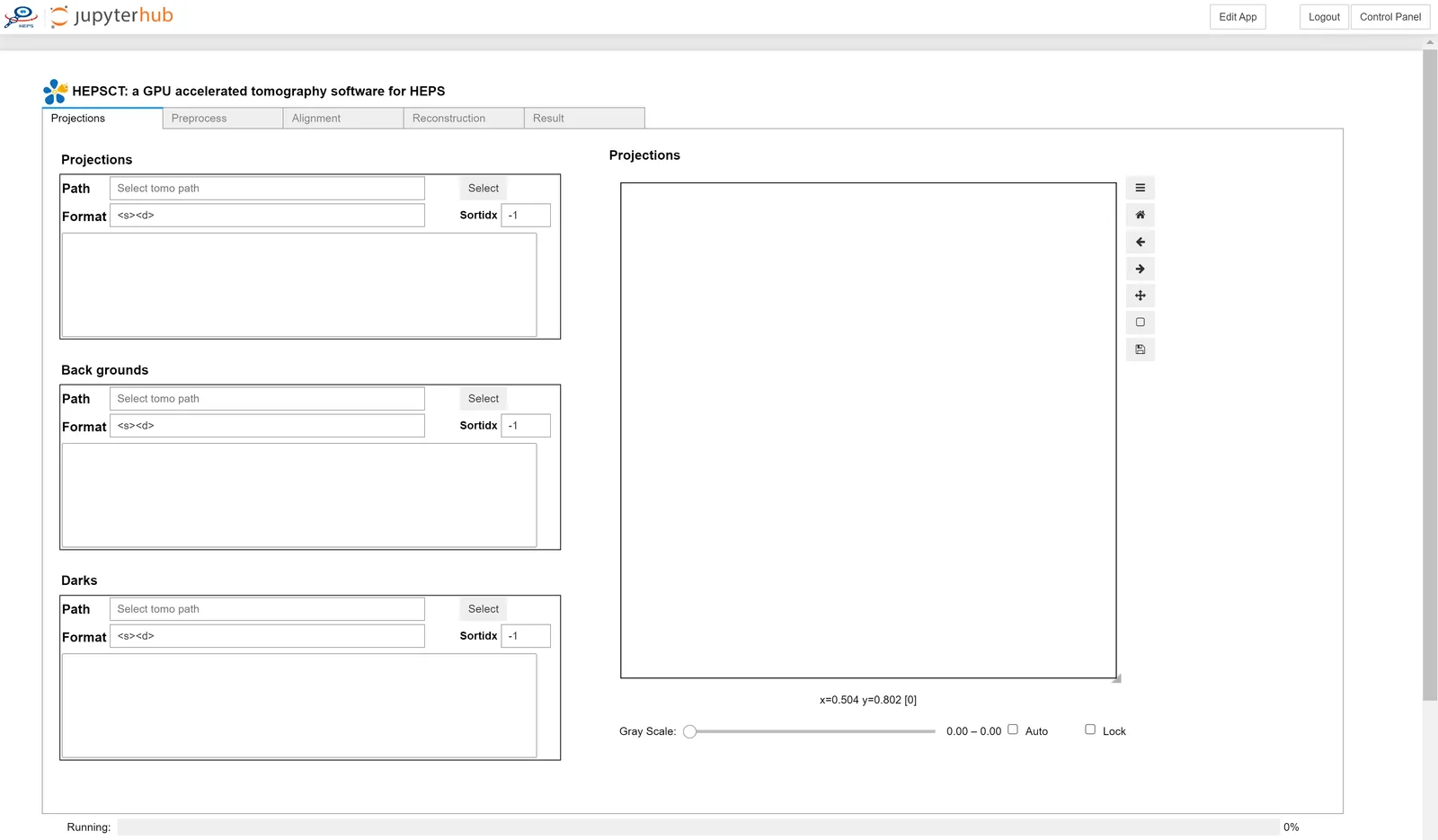
Main window: data path, format and file list on the left; the Projections / Preprocess / Alignment / Reconstruction / Result tabs on the right
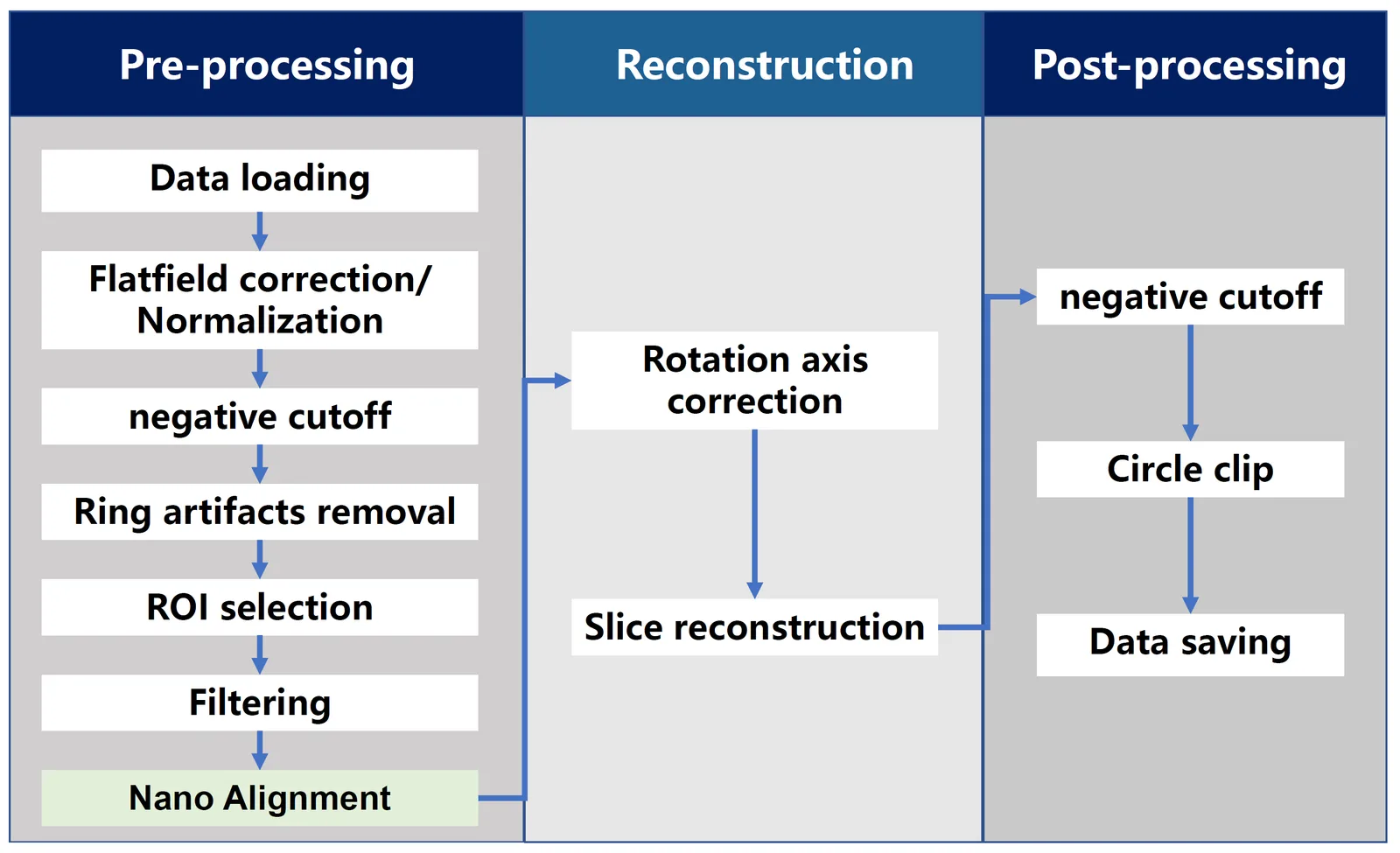
Processing workflow: loading, pre-processing, alignment, reconstruction and post-processing
Projections tab: choose the projection path and load projections, flats and darks, optionally a subset of the file list
Preprocess tab: denoising, background subtraction, negative-value removal, ROI and background-ROI normalisation, with a line-profile preview
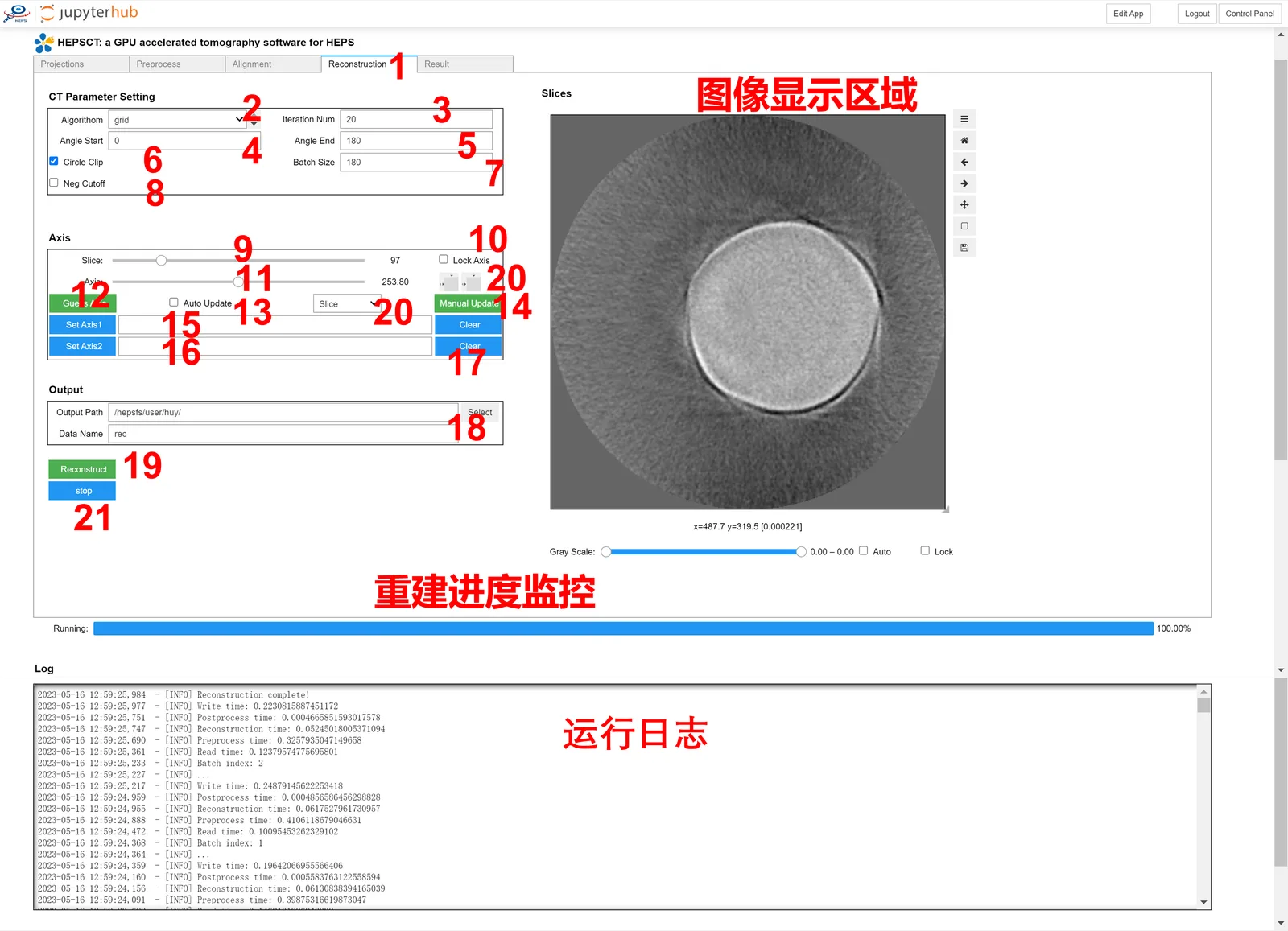
Reconstruction tab: choose FBP / Grid / EM, set the angle range and slice thickness, estimate or fine-tune the rotation axis and preview slices
Result tab: inspect the reconstructed slices
Loading nanoscale CT data: select the nanoscale CT path in the Projections tab
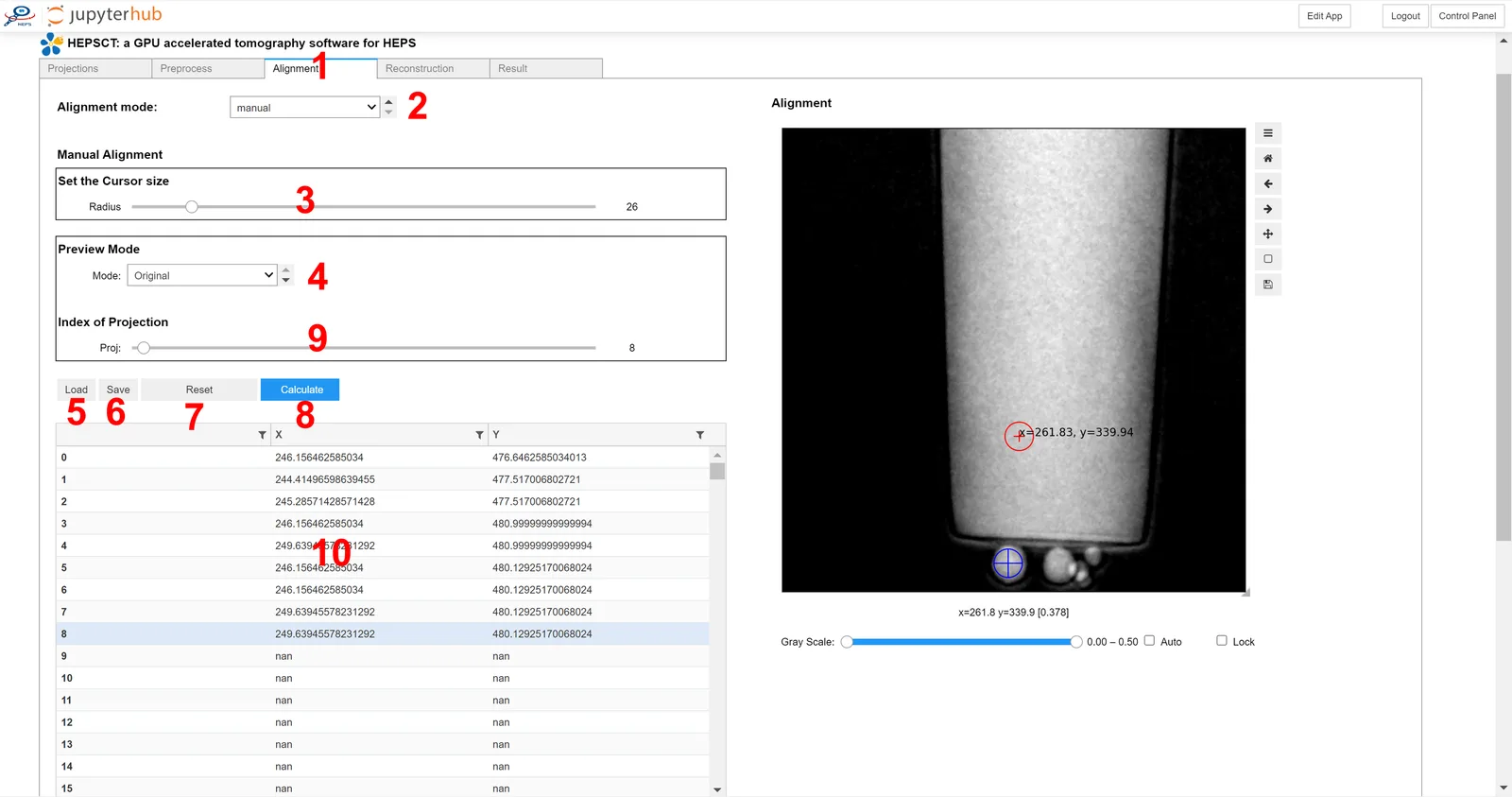
Alignment tab, manual mode: adjust the offset of each projection to correct stage jitter
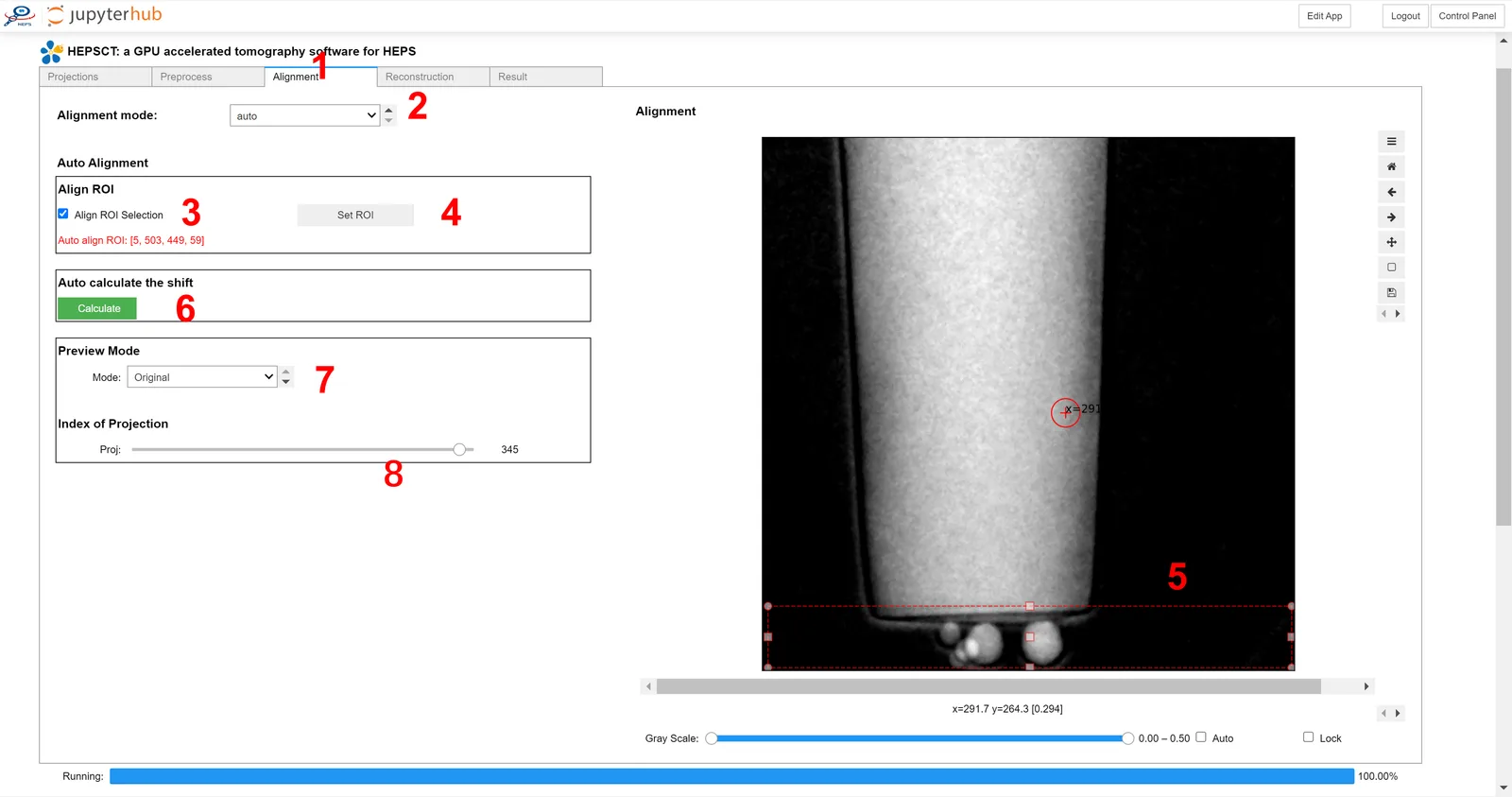
Alignment tab, automatic mode: set the marker size and iterations, calibrate the rotation centre automatically and plot the error curve
Nanoscale CT reconstruction: set the algorithm, angle range and slice thickness, then preview the slices

Features & algorithms

Runs in a browser, or install it offline

The ipywidgets / JupyterLab front end is hosted on the TORCH computing platform, so a browser is enough; Windows / Linux desktop packages are also provided.

GPU-accelerated reconstruction

The reconstruction core is fully GPU accelerated with multithreaded I/O and overlapped CPU/GPU work; Grid reconstructs a 2k×2k projection dataset in seconds.

Rotation-axis correction and ring removal

Automatic multi-scale rotation-axis correction, interpolated between separately measured upper and lower axes, plus wavelet-based ring artifact removal.

Stage-jitter correction for nanoscale CT

Manual and automatic (marker-based) modes correct the projection drift caused by stage jitter.

Projection-domain stitching

Horizontal, 360°→180° and vertical stitching merge several detector scans into one volume, with batch runs, positions files and reports.

Multi-GPU parallel reconstruction

Reconstruction jobs can be spread over several GPUs, which suits large batches of CT data.

Available versions

VersionPlatformFile sizePublishedDownloads
No package yet — use it online in TORCH.

Contacts

胡
胡誉
huyu@ihep.ac.cn

Contact the maintainers above for usage, adaptation or customisation.