Synchrotron Data Analysis Software Platform
Software
All softwareBrowse the full catalogueImagingCT, Ptycho, BCDI, HoloDiffraction & scatteringPDF, SAXS, BMX, XPCSSpectroscopyXAS, XRF, XRS, PCA/LCFData toolsConversion, cropping and formatsArtificial intelligenceSparse-view CT, training and inference
Download
Download centreAll software packagesDownload & installLicence, checksums and setup
Documentation
DocumentationAll documentationSoftware manualsUser guidesAPI guidePublic and maintainer APIsDownload & installChecksums and setupDAISY user docs ↗Framework and algorithms
NewsTeamAbout DAISYTORCH platform ↗
中文
DAISY Data Processing Software

Official site of HEPS DAISY data processing software: introductions, online access and downloads.

Navigation
  • Software
  • Download
  • Documentation
  • News
  • Team
  • About DAISY
  • Admin
Links
  • TORCH platform ↗
Institute of High Energy Physics, CAS · HEPS Big Data Centre
← Back to software
Imaging

MOCUPY

GPU-accelerated standalone CT reconstruction software developed by the HEPS X-ray microscopy imaging beamline team, supporting TIFF data, micro/nano CT, jitter correction, phase recovery and multiple iterative reconstruction methods.
BeamlinesID21
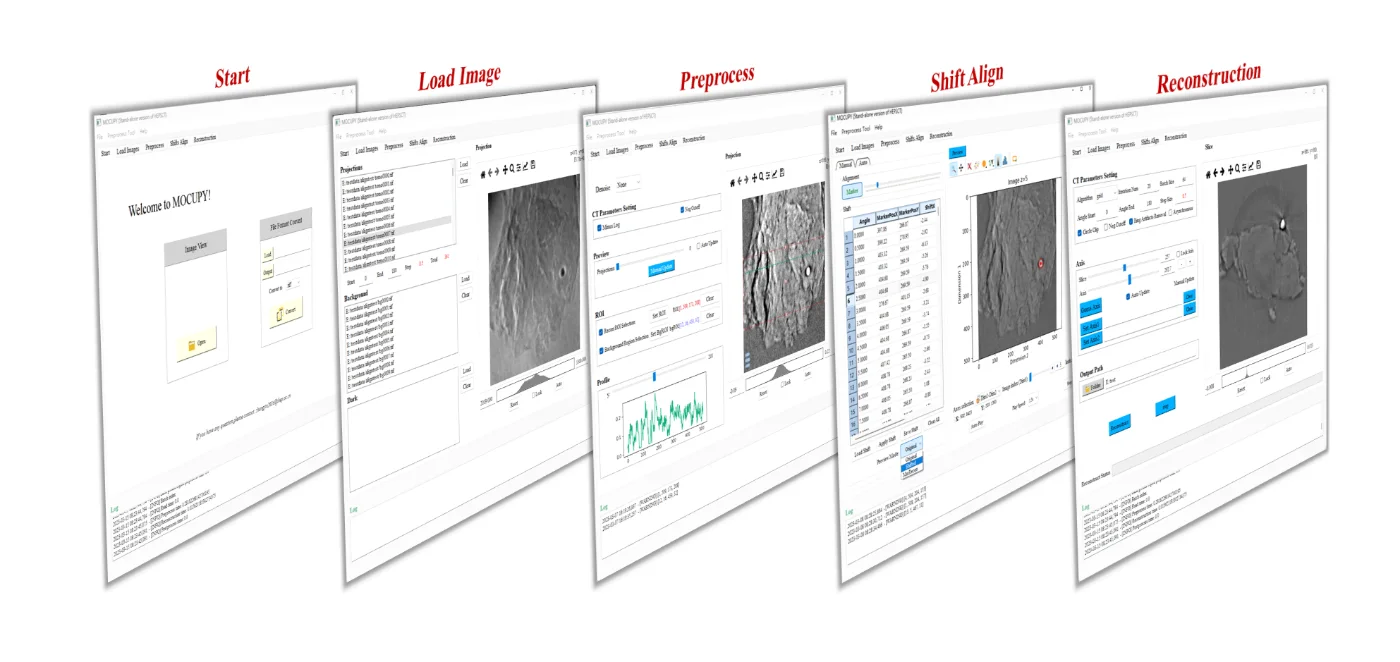
MOCUPY screenshot

About this software

MOCUPY is a GPU-accelerated standalone CT reconstruction application developed by the HEPS X-ray microscopy imaging beamline team with support from the HEPS project. It is the standalone edition of HEPSCT, written in Python with CUDA-accelerated core algorithms for fast offline reconstruction of X-ray CT data.

Main modules

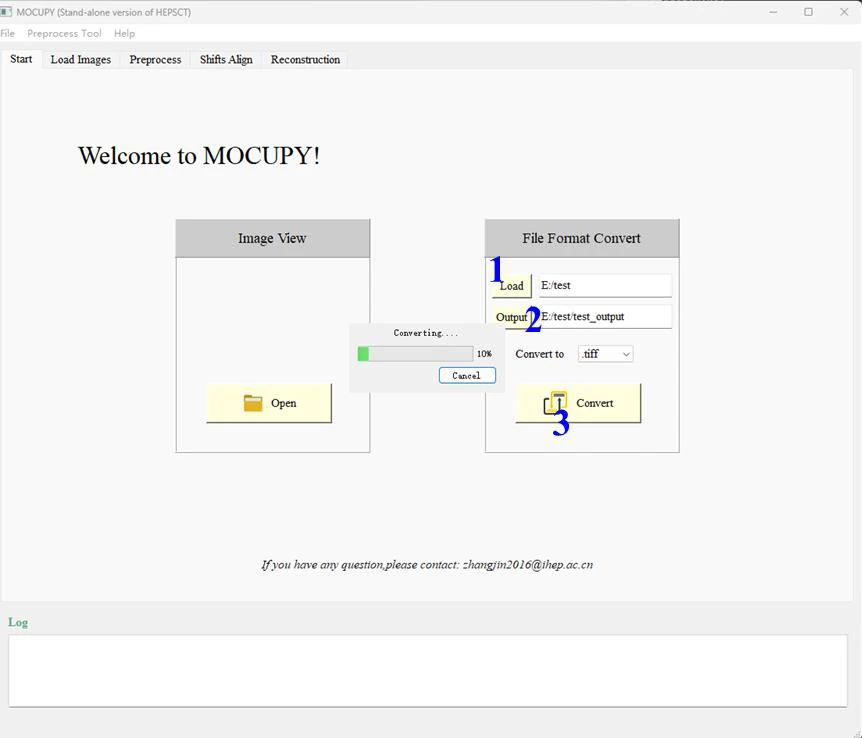
  • Start: image preview, TIFF conversion and saving
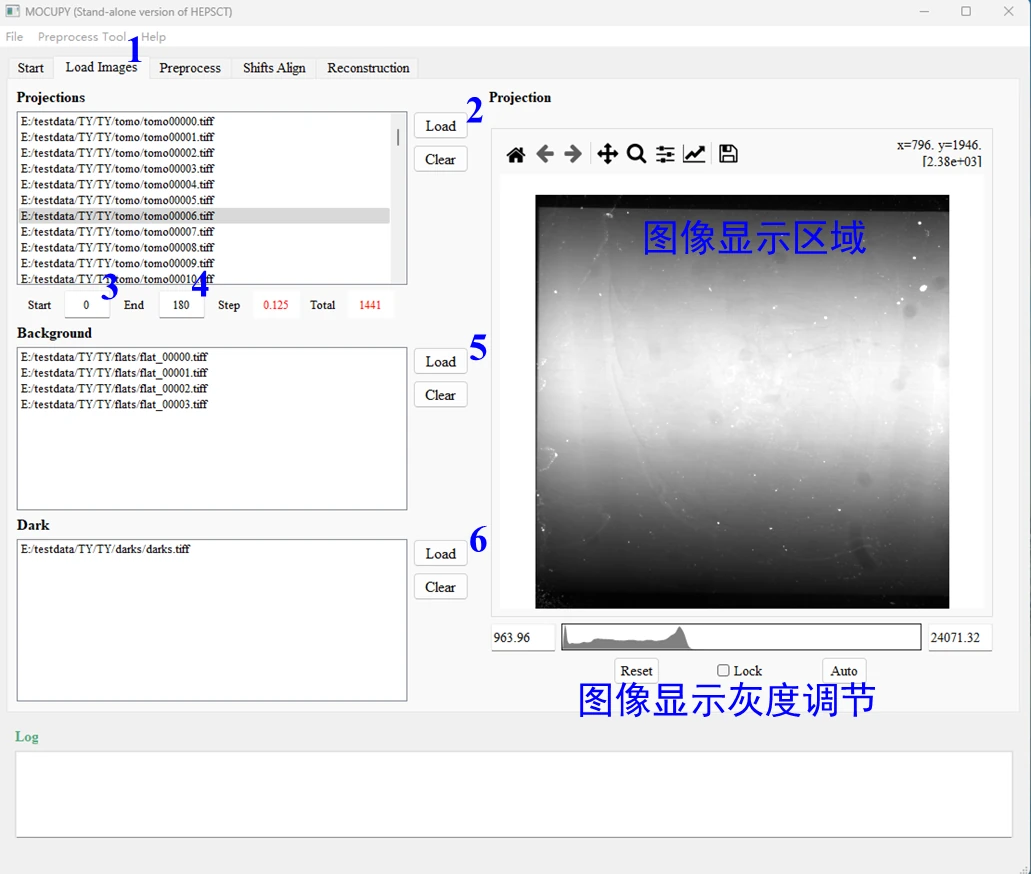
  • Load Images: import projection, flat-background and dark images
  • Preprocess: denoising, background subtraction, negative-value handling, masking, normalisation and line-profile preview
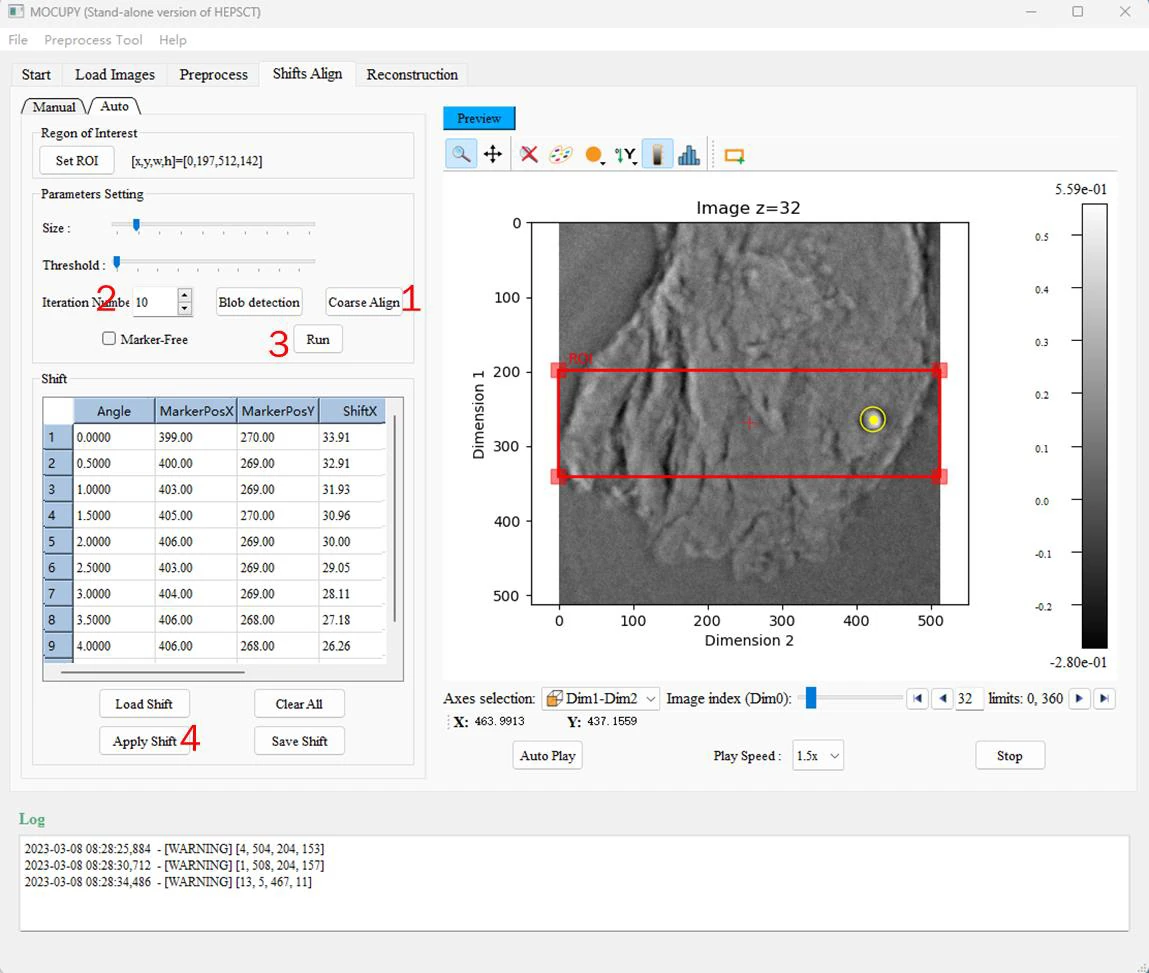
  • Shifts Align: manual and automatic nanoscale CT image jitter correction
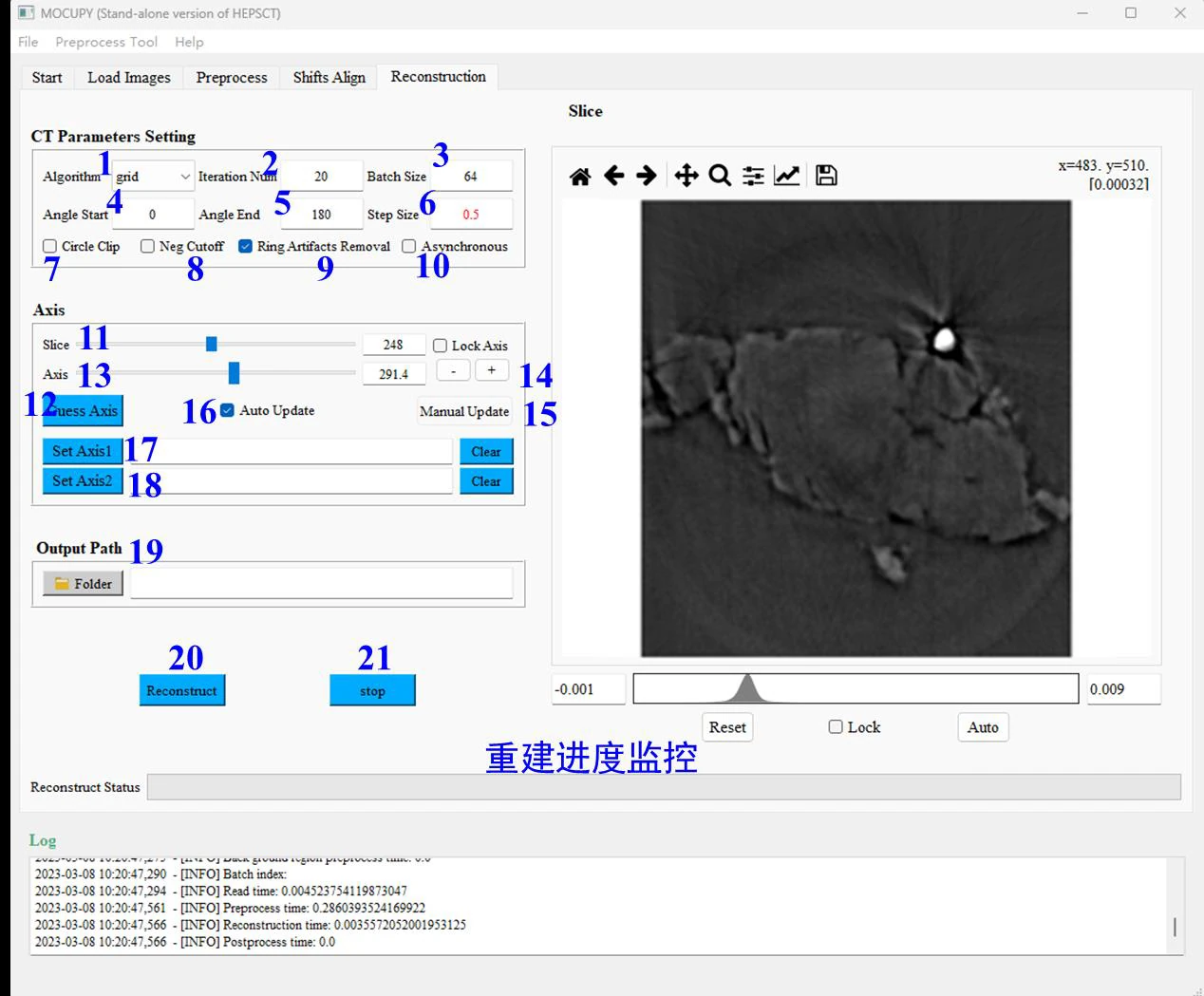
  • Reconstruction: algorithm selection, ring-artifact removal, rotation-axis correction and slice preview

Data and algorithms

  • Input: uncompressed TIFF with 8-bit uint, 16-bit uint or 32-bit float data
  • Output: 32-bit float TIFF datasets
  • Converts compressed or uncompressed 12-bit TIFF to 16-bit TIFF
  • Supports absorption-contrast micro CT, nanoscale CT with jitter correction, and inline phase-contrast phase recovery
  • FBP, Grid, EM, SIRT and CGLS reconstruction algorithms

System requirements

  • NVIDIA GPU/compute card based on Turing, Ampere or newer architecture
  • NVMe SSD recommended for data I/O
  • Sufficient system memory for reconstruction

The current public release is V2.0 (2025.07), with an updated TIFF I/O library and interface optimizations.
Software interface

MOCUPY Start screen for image preview and TIFF format conversion
Load Images screen for projections, flat fields, dark images and projection range settings
Shifts Align screen with automatic and manual stage-jitter correction
Reconstruction screen with algorithm, rotation axis, slice range and output settings
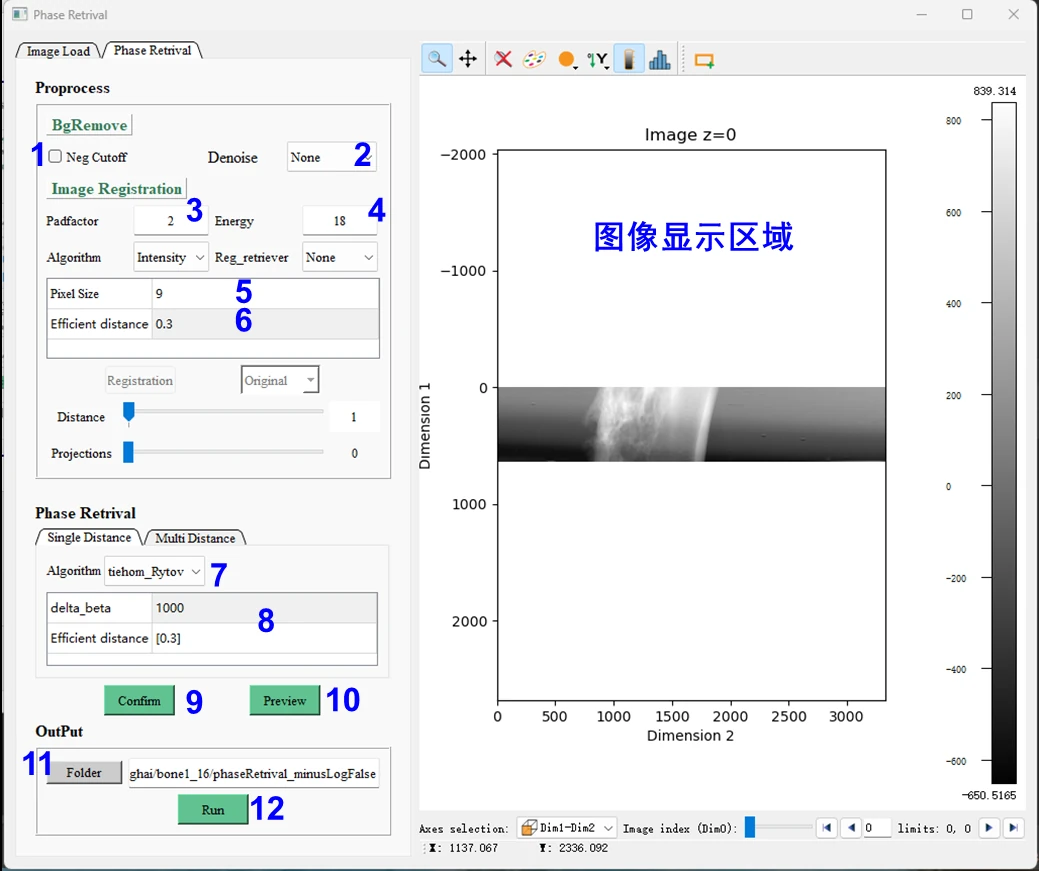
Phase Retrieval screen supporting single- and multi-distance inline phase recovery

Features & algorithms

GPU-accelerated reconstruction

The reconstruction core is fully GPU accelerated, with multithreaded I/O and overlapped CPU/GPU processing.

Jitter and artifact correction

Automatic multi-scale rotation-axis correction, subpixel nanoscale CT stage-jitter correction and wavelet-based ring artifact removal.

Phase recovery

Single- and multi-distance inline phase recovery with TIE, CTF, tiehom_Rytov, tiehom_Paganin and HIOER algorithms.

Multiple reconstruction methods

FBP, Grid, EM, SIRT and CGLS reconstruction, with Grid reconstructing a 2k×2k projection dataset in seconds.

Documentation & manual

Official software pageDownload↓User manual PDFRead the full guide in the browser→Test data 01Download↓Test data 02Download↓Technical contactDownload↓

Available versions

VersionPlatformFile sizePublishedDownloads
2.0.0
CTRecon_V2.0_202507.rar
Windows · x641.7 GB03/11/202615

Download links are time-limited and support resume; verify the SHA-256 checksum.

Contacts

张
张锦Primary
zhangjin2016@ihep.ac.cn

Contact the maintainers above for usage, adaptation or customisation.
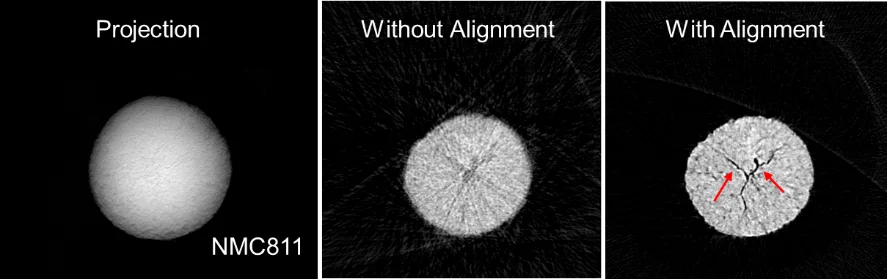
Reconstructed slices before and after automatic nanoscale CT stage-jitter correction
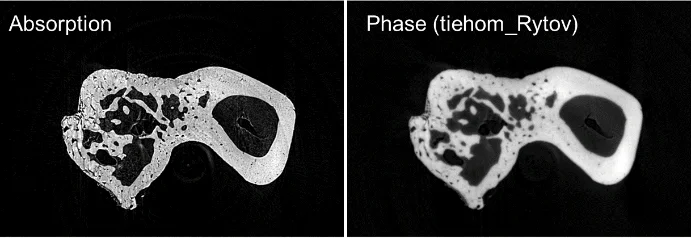
Direct reconstruction and phase-recovered slices of a bone sample in single-distance mode